

DDoS Testing Checklist for Cybersecurity Managers: 9 Questions to Ask Before You Test


Key Takeaways
- A DDoS test is only as useful as the preparation behind it – a simulation run against a poorly understood environment will confirm very little
- Red Button begins every engagement with a structured pre-test interview covering architecture, protection tools, traffic flows, and risk tolerance before a single packet is sent
- This checklist covers the 9 questions your team must be able to answer before testing begins
Before You Test: Why Preparation Determines What You Find
Running a DDoS simulation testing without first analyzing your environment is, in most cases, less likely to uncover weaknesses.
The difference between a test that uncovers real exposure and one that produces a clean report is almost always preparation.
Red Button’s methodology is built around this. Every DDoS testing engagement begins with a one-hour pre-test interview. The approach is white-box: before any attack vectors are designed, the team learns the actual architecture: where traffic enters, what sits in front of what, and which tools have been configured to do what. The attack scenarios are built from that understanding, not from a generic template.
1. Which DDoS Protection Tools Are Deployed?
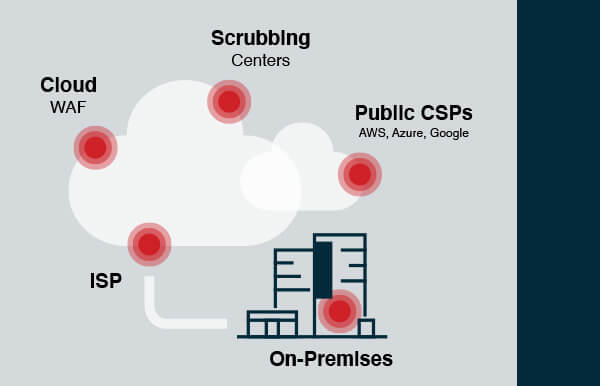
Start with an inventory of every tool in your protection stack, then map where each one sits in your traffic path and what layer of the network it actually defends. There are five main deployment models for DDoS protection, each with a different coverage profile:
- On-premises appliances/WAFs — protect against L3/L4 network attacks and application-layer threats, but cannot absorb attacks that saturate the internet pipe and do not scale well against large volumetric floods
- ISP protection — straightforward to set up, but covers network-layer attacks only; no application-layer defense, and smaller ISPs lack the bandwidth to absorb large volumetric attacks
- Cloud WAFs — handle both volumetric and application-layer threats, but cannot block direct-to-origin attacks; require handing over private keys to the provider
- Scrubbing centers — stop all network attack types, including direct-to-origin, but provide no L7 protection; more complex to implement, requiring BGP diversion and GRE tunneling
- Public CSPs (AWS, Azure, GCP) — include baseline network protection out of the box, but application-layer mitigation is charged separately, and configuration is your responsibility
See also: Understanding DDoS Protection Options Whitepaper
2. Have the Tools Been Configured Beyond Factory Defaults?
Out-of-the-box DDoS protection settings are designed to work across many different environments. They are not designed for yours.
Generic defaults typically mean rate thresholds calibrated for average traffic profiles, detection rules that are either too sensitive or not sensitive enough, and mitigation modes that prioritize availability over accuracy – or vice versa. In most cases, they provide partial protection at best.
Configuration is the single most common remediation action following a Red Button simulation. It appears more frequently in post-test recommendations than adding new tooling, because in many cases, the tools an organization has already deployed are capable of significantly better protection; they simply have not been tuned to deliver it.
Before testing, confirm that each tool in your stack has been reviewed and configured for your specific traffic baselines, application behavior, and risk tolerance. If it has not been touched since deployment, assume the defaults are still in place.
3. What Assets Are In Scope, and What Is Explicitly Out of Scope?
Define the test boundary before the test begins. This means specifying which production services, IP ranges, domains, and APIs are in scope (and which are not).
The scope definition should distinguish between production and pre-production environments, identify any third-party services that share infrastructure with in-scope assets, and flag anything that cannot tolerate even temporary degradation.
Two things happen without a clear scope. First, untested assets remain untested attack surfaces – gaps that go unexamined because they were simply not included. Second, scope creep during the test wastes time and undermines the validity of results. If the team is mid-simulation and someone raises a question about whether a particular service was supposed to be included, the answer needs to already exist.
4. Do You Have a Network Architecture Diagram That Shows All Protection Layers?
Understanding your organization’s full architecture allows the testing team to focus attack scenarios on the components and paths that matter most, improve the specificity of recommendations, and avoid designing tests around assumptions that turn out to be wrong.
In the Israeli bank DDoS hardening case study, an architecture audit conducted during the pre-test phase revealed that key protection components had been deployed in the wrong positions – they were not in the actual traffic path they were meant to defend. The primary remediation was redeployment, not new tooling. Without reviewing the architecture diagram first, the test would have been designed around a protection setup that did not reflect operational reality.
5. Will Testing Run Against Production, Pre-Production, or Both?
The default assumption for many organizations is that DDoS testing should happen against a pre-production environment to avoid any risk to live services. This is understandable, but it significantly reduces what the test can tell you.
Red Button’s position is to test production wherever possible. Pre-production environments rarely replicate the actual traffic volumes, application behavior, and mitigation triggers that matter most. A protection tool that holds up in staging may behave differently when it is also handling real user traffic.
The concern about impact is addressed through safe DDoS testing methodology, not by moving to a less realistic environment. Testing uses a gradual traffic ramp-up, and the team operates with a kill switch that stops the test immediately if undesired impact is detected. Scheduling is flexible; tests can run at night or on weekends to minimize the risk of affecting users.
If production is genuinely off the table, document why, and be explicit about what the pre-production results will and will not tell you.
6. What Is Your Maintenance Window, and Who Needs to Be Notified Before Testing Starts?
DDoS simulation generates traffic patterns that, by design, look like an attack. Your ISP, CDN provider, cloud provider, and upstream transit providers are all capable of detecting and blocking that traffic, which is exactly what they are supposed to do.
The problem is that if they block test traffic before it reaches your infrastructure, the test produces a false negative. Your tools appear to have held up. In reality, the protection you thought you were testing never saw the traffic.
Internal teams need to know as well. Your NOC and SOC should not be responding to what appears to be an active incident during a scheduled simulation. Notifications need to go out far enough in advance that everyone with the authority to intervene has confirmed they will not.
Establish the maintenance window, build the notification list, and confirm that advance notice has been sent before finalizing the test date.
7. What Is the Acceptable Impact Threshold: At What Point Should the Test Stop?
The threshold should specify what constitutes acceptable degradation versus an abort condition, for example, a 20% increase in latency within tolerance, or a complete service outage triggering an immediate stop. It should account for different services differently, since not all assets carry the same business risk.
Without a defined threshold, the testing team cannot make real-time decisions during the simulation. If something starts to degrade and there is no pre-agreed line, the test either stops too early (leaving potential coverage untested) or runs too long (causing actual impact). Neither outcome serves the purpose of the exercise.
8. Who Receives the Test Report, and Who Is Responsible for Acting on It?
Before the test begins, confirm who receives the report, who has the authority to prioritize the findings, and who is accountable for implementing the recommended changes. If the answers to those three questions point to different people, establish the handoff process.
Red Button’s reports list all identified vulnerabilities, prioritized by severity, with actionable recommendations and re-test options for each. You can review a sample DDoS simulation test report to understand the structure. The value of that report depends entirely on what happens after it is delivered, which depends on the accountability structure being in place before the test runs.
9. When Will You Re-Test After Remediation?
A single test confirms you found problems. A follow-up test confirms you fixed them.
Schedule the re-test before the first test runs. This is not a formality — it is the mechanism that closes the loop between finding a vulnerability and validating that the remediation worked. Without it, there is a gap between the organization’s assumed security posture and its actual one.
The impact of this cycle is measurable. In one engagement with an HR company, the DDoS resiliency score improved from 1.5 to 5.375 after implementing Red Button’s recommendations and completing a follow-up simulation. Read the full details in the HR company DDoS case study.
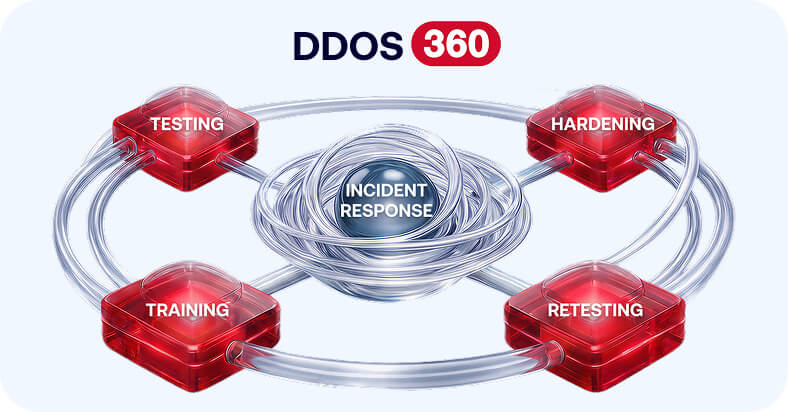
For organizations that require continuous validation rather than point-in-time snapshots (particularly those operating under DORA or NIS2 obligations), DDoS 360 provides an ongoing testing and monitoring program structured around this principle.
FAQs
Why is preparation important before running a DDoS test?
Because without a clear understanding of your environment, the test may miss critical gaps or produce misleading results.
What should be defined before a DDoS simulation starts?
Scope, architecture, protection tools, acceptable impact thresholds, and who is responsible for monitoring and response.
Should DDoS testing be done in production or pre-production?
Production testing provides more realistic results, while pre-production reduces risk but may miss real-world behavior.
What is the most common issue found during DDoS testing?
Misconfigured protection tools that were never tuned beyond default settings.
Why is re-testing after remediation necessary?
Because it verifies that identified vulnerabilities were actually fixed and that defenses perform as expected.
About the author